Cookie Settings
We use cookies to analyze our traffic and create a smooth user experience for you. By continuing to use the website, you agree to our Cookie Policy.


|
 |
Play rotating loops of preferred Smart Client views ... Automatic ... Hands-free.
The Mixtape™ plug-in for the Smart Client enhances monitoring capabilities by automatically cycling through a user-defined set of Smart Client views. It functions as a "virtual patrol," allowing operators to monitor different sites - or different areas within sites - by automatically calling up different views.
Mixtape brings Smart Wall-style display functionality to any version of Milestone XProtect. Avoid the higher cost of "Corporate" licensing with this "poor man's" Smart Wall.
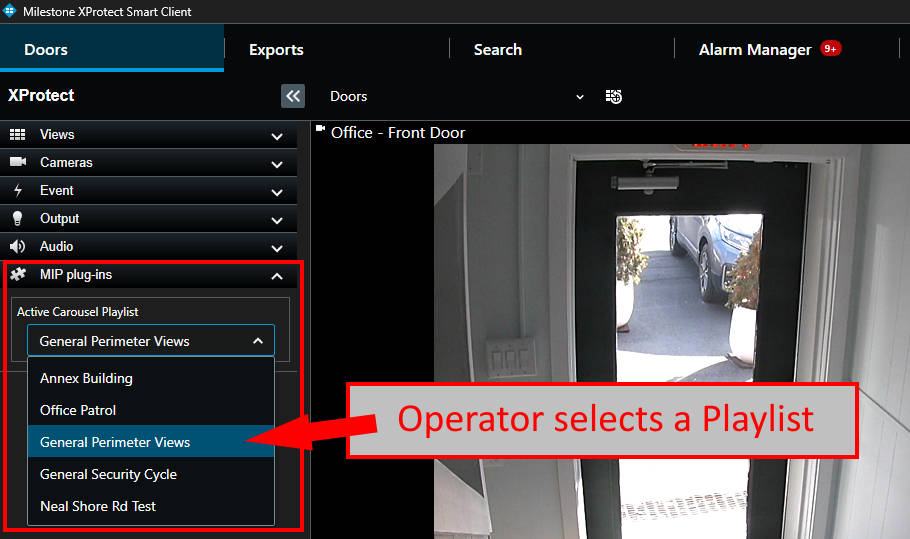
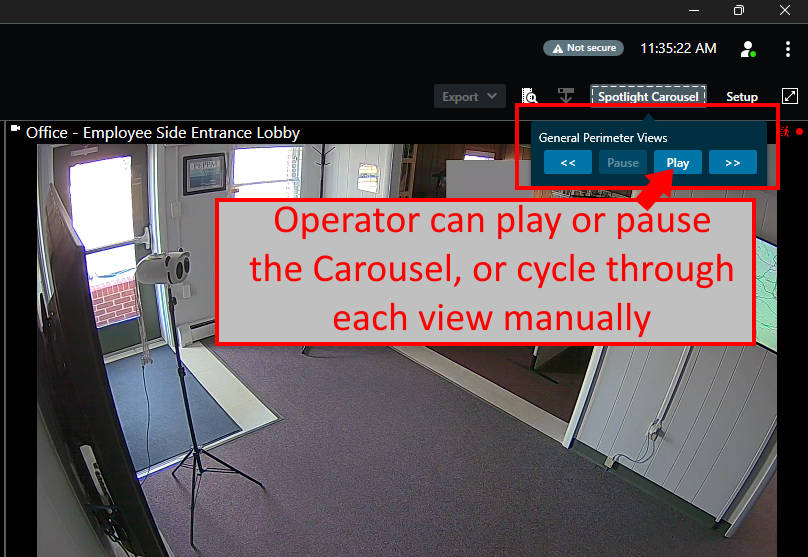
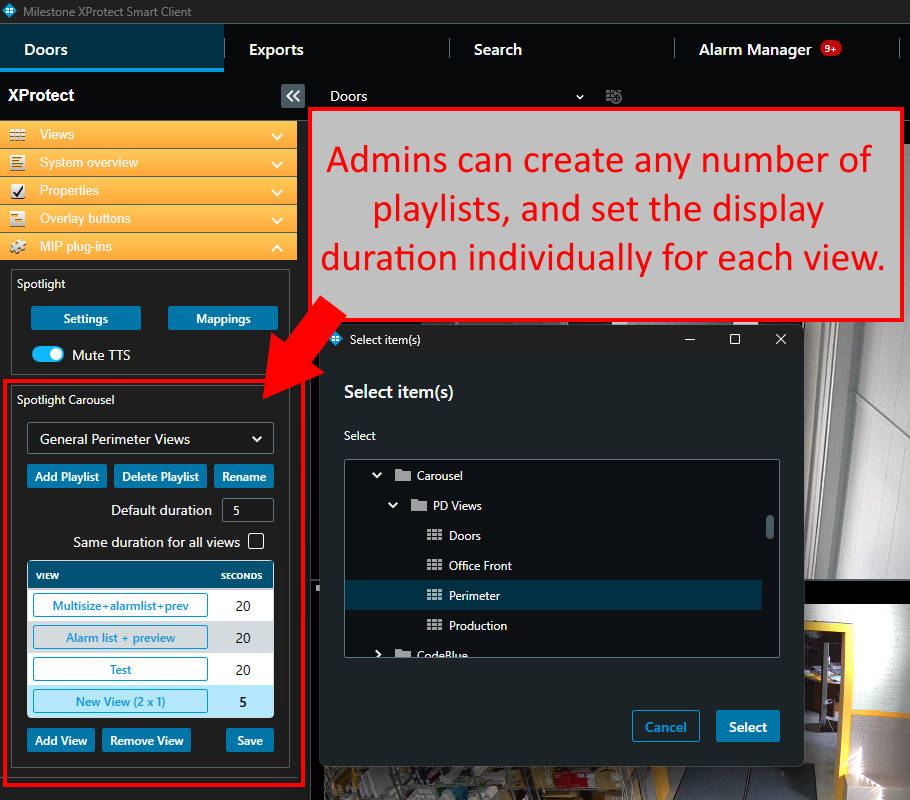
Mixtape™ is completely plug-and-play. Simply choose any number of views, define a display duration, and press "Play". If necessary, Smart Client operators can pause the playlist, manually cycle through the views, or play a different playlist altogether.
Any number of playlists can be created, and Smart Client operators can select from a dropdown to quickly switch between pre-defined playlists.
Setup occurs entirely within the Smart Client; it avoids the need for Smart Wall commands, user-defined events, rules, management or event server plug-ins, or other back-end configuration!
When used with App-Techs' Spotlight Plug-in for the Milestone XProtect Smart Client, Mixtape can automatically jump to a relevant view when an alarm-of-interest occurs and announce the alarm with text-to-speech audio announcements. The alarm view does not have to be part of the Mixtape view playlist. Once the alarm is cleared, or a pre-set timer clears, Mixtape resumes the playlist exactly where it left off.
When situational awareness is essential, the Mixtape puts eyes on all area of your facility, dynamically and hands-free. Let Mixtape keep your operators alert and aware.
Mixtape is licensed per workstation (MAC address). Contact App-Techs to purchase license keys or to schedule a live demo.
Shop Now Contact App-Techs for more information
*Unmute the audio to hear text-to-speech alert*
Use Case # 1 - Multi-site Monitoring
A retail company with multiple locations seeks to centrally monitor its properties from headquarters. Each day, a Smart Client operator is assigned a subset of sites to monitor for security incidences.
With Mixtape, the operator simply selects from among a pre-defined set of playlists. After pressing "Play," the operator will automatically view a series of live views at each site at regular intervals.
If an operator views something of interest, Mixtape can be paused to keep the current view on-screen. Optionally, the operator can manually cycle through a previous view. Once the alarm has been reviewed, the operator presses "Play" to resume the regular view cycle.
Optionally, when combined with App-Techs' Spotlight plug-in, Mixtape can be configured to associate a particular alarm-of-interest with a particular view -- even if the view is not a part of the active playlist. When the alarm occurs, Mixtape will abruptly pause the playlist cycle and display the alarm-specif view. Text-to-speech audio announcements cand be added to alert an operator of the alarm.
Thus, if a door is propped open at site #14, the operator will hear "Door Forced, Site Fourteen" and the relevant view will automatically appear.
Situational awareness is achieved without any need to manually jump between views to view the event of interest.
Use Case # 2 - "Heads-Up" Display Monitors
A police department dispatch center uses Mixtape to monitor activity in public parks and major intersections.
The dispatcher can monitor activity across the city without needing to manually switch views.
However, when an call is dialed from one of the city's many emergency call boxes, the Mixtape immediately switches the on-screen view to the location of the call box and announces, "Emergency phone dialed."
Mixtape allows the dispatcher to visually confirm if caller may require medical attention and call for an officer response.
After a few minutes, Mixtape will resume its regular playlist.
|
Copyright © 2003 -
App-Techs Corporation. All rights reserved. |


|
Consent Preferences
|

