Cookie Settings
We use cookies to analyze our traffic and create a smooth user experience for you. By continuing to use the website, you agree to our Cookie Policy.


|
 |
Get the integration through Alta Apps →
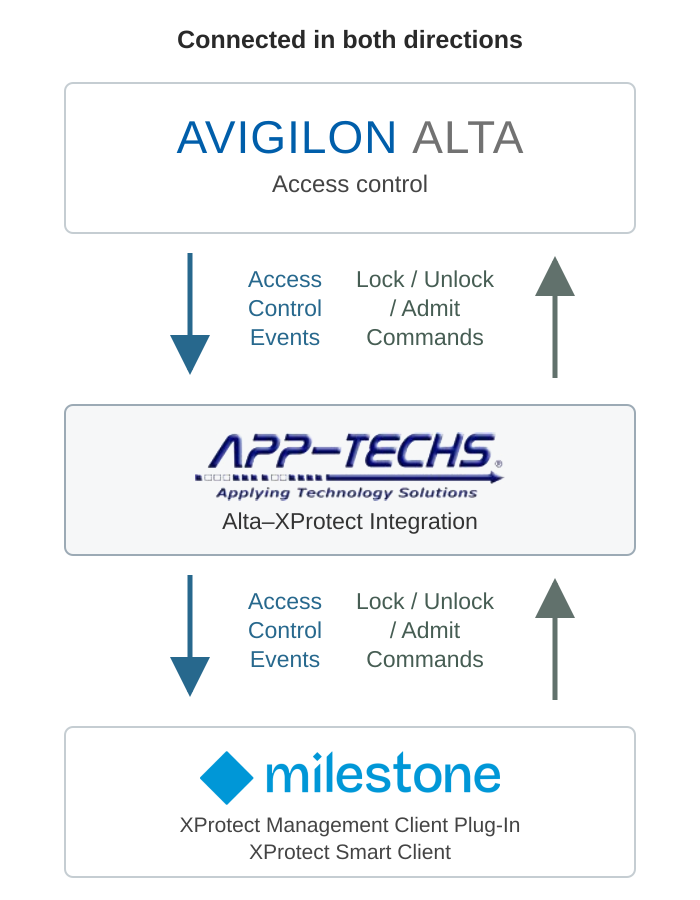
App-Techs brings Avigilon Alta Access and Milestone XProtect together through a bi-directional integration that puts access control monitoring, video verification, and door commands in XProtect Smart Client.
Monitor access events, check door status, and review associated camera footage from the same interface. Operators can also send lock and unlock commands back to Alta directly from Smart Client, subject to configured permissions. When conditions such as a forced entry or a door left ajar require attention, access control events can trigger XProtect alarms for investigation and response.
Originally created by App-Techs for Openpath, the integration continues as part of the Avigilon Alta ecosystem. Available through the Alta App marketplace, it connects Alta’s cloud-managed access control with the Milestone environment customers already use.
Ready to bring Alta access control into your XProtect workflow? Contact App-Techs to schedule a demonstration or discuss questions about the integration and your deployment.
View Installation Documentation Contact App-Techs for more information
The integration connects Avigilon Alta Access to Milestone through XProtect Access. Alta manages the access control system; XProtect provides the associated video and the Smart Client interface for monitoring access activity and issuing supported door commands.
App-Techs develops integrations that connect third-party security systems with Milestone XProtect. Our work on the original Openpath integration is part of that history: connecting access events, video, and operator controls in a practical workflow.
The Milestone integration is available through the App marketplace in Alta Access. To find it:
Access and permissions: App availability depends on your organization's configuration and your account permissions. If Apps is missing or you cannot get the Milestone app, contact your Alta administrator or integrator to confirm access and any required subscription entitlements.
For installation and configuration details, refer to Avigilon's Milestone integration documentation. Confirm the applicable Alta subscription, XProtect Access licensing, and system compatibility requirements before deployment.
|
Copyright © 2003 -
App-Techs Corporation. All rights reserved. |


|
Consent Preferences
|

